
ChatGPT : All reply output formats ChatGPT can do
What kind response format can give ChatGPT ?
Get a data table, a graph, a diagram or code with ChatGPT !
Follow us on Twitter 
Question, remark ? Contact us at contact@myengineeringtools.com
1. Introduction
2. All the different formats of responses ChatGPT can do
3. Interactive Prompt Formatter & Token Budget Calculator
4. Engineering Best Practices & Verification Rules of Thumb
1. Introduction
In the ever-evolving landscape of AI and language technology, Engineers find themselves on the cusp of a new frontier, a new frontier that we must explore, and that they need to adapt to. "In the fields of observation, chance favors only the prepared mind" (Louis Pasteur), in this article, we would like you to help prepare your mind to the increasing place tools like ChatGPT will place in your life. Embark on a journey to uncover the diverse array of output formats that ChatGPT can do. By delving into its capabilities, a world of possibilities unfolds—each one a unique conduit for delivering information in forms both structured and creative.
ChatGPT possesses the ability to engage in dialogues that simulate real interactions, while also generating other kind of outputs like code snippets that encapsulate intricate logic. While graphical elements like graphs remain beyond its immediate reach, ChatGPT's power to yield textual data opens doors to the creation of visual representations using external tools. There are however some exceptions and some very basic graphs can now be done thanks to ChatGPT as you can discover below.
Top 5 Most Popular
1. Compressor
Power Calculation
2. Pump Power Calculation
3. Pipe Pressure
Drop Calculation
4. Fluid Velocity in pipes
5. Churchill Correlation
(friction factor)
2. All the different formats of responses ChatGPT can do
2.1 Text output
This is the standard format of ChatGPT, however you can still make text prompts more attractive or readable. For instance, you can decide to highlight some titles, make some indentation. Actually you don't need to stop when ChatGPT has given you a "correct" reply, you can go further simply by interacting with the tool, like you would do with an assistant.
Example prompt : "Can you please write a note to explain about
pneumatic conveying. Act as Engineer. Make maximum 200 words"

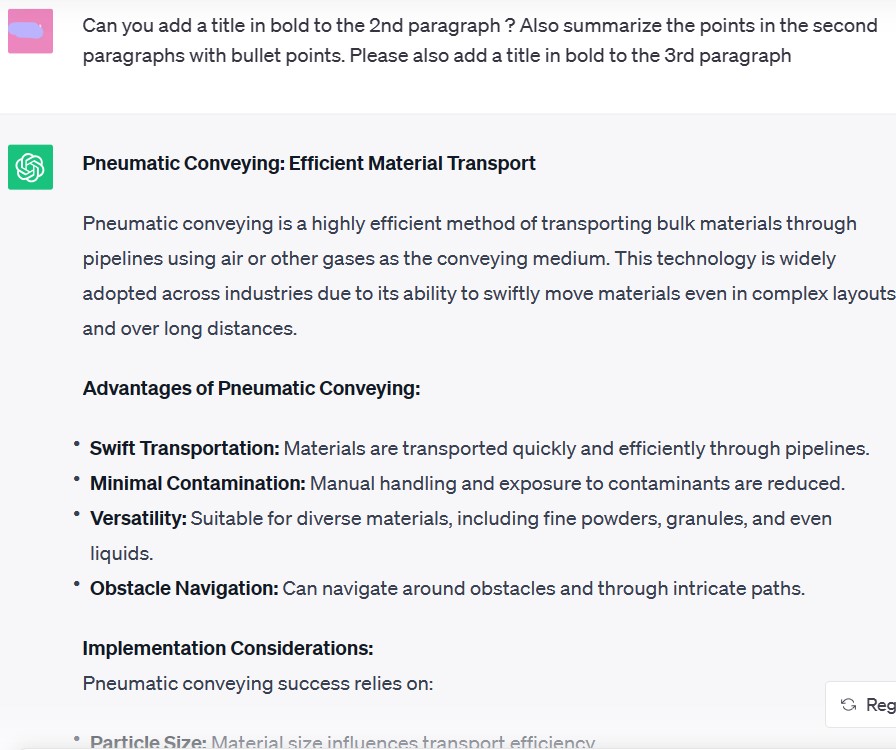
Now you want to structure the note with titles and bullet points, you can just follow up and explain what you want to ChatGPT
Example prompt : "Can you add a title in bold to the 2nd paragraph ? Also summarize the points in the second paragraphs with bullet points. Please also add a title in bold to the 3rd paragraph"
| You can also check more resources about ChatGPT on
MyEngineeringTools.com : |
2.2 Tables
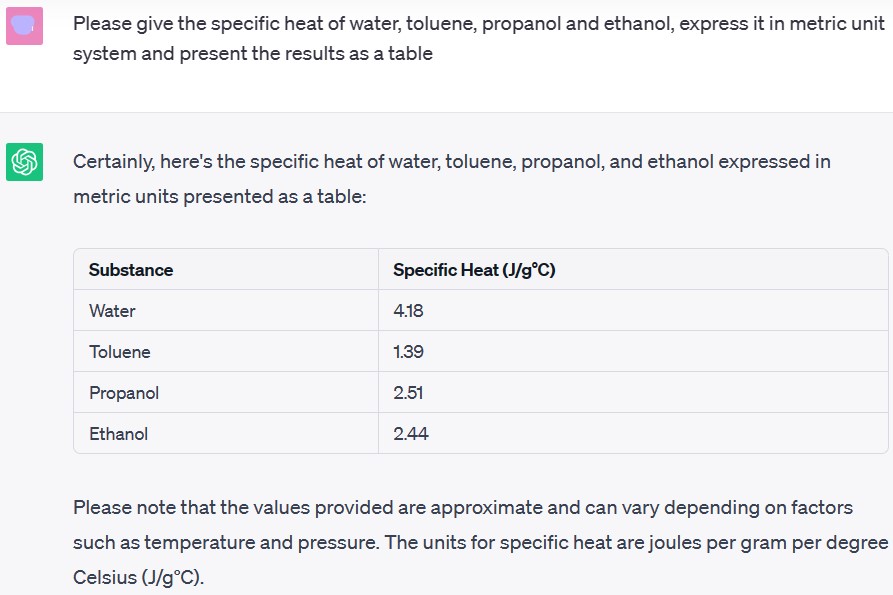
Yes it is possible to show a table on ChatGPT which is particularly handy for Engineers. This can be used for example to show a list of physical properties, a list of common issues and possible remedies.
Prompt example : "Please give the specific heat of water, toluene, benzene and ethanol, express it in metric unit system and present the results as a table"
2.3 Diagrams
ChatGPT can also produce diagrams, but with the limitation of using line diagrams, with text symbols to build the diagram. It is a little bit like what we had in the 80s... but at least it offers a representation that helps understand concepts.
Example prompt : "Can you create a diagram that will show how a company is structured ? Show the diagram in markdown"
Note that the trick here is to ask for the output in markdown format.

2.4 Graphs
It is surprising but it is actually possible to produce some very basic graphs with ChatGPT ! This can be handy for Engineers wanting to check a graphical representation. Once again we need to precise we want the output in markdown format, and once again it seems it comes for 386 on MS DOS in the 80s but it is a start !
Example prompt : "Can you show a graph using markdown for the equation y=2x+1"
By the way it shows that ChatGPT understands the equation, which can be very handy for Engineers.

2.5 CSV files
Ok if the previous examples were very basic, and maybe not too much useful at this stage, they showed the potential of ChatGPT and where it (other new tools) might go in the future. What can be much more useful is to output in csv format, that can be used in Excel.
Example prompt : "Can you present on a csv format the following data about 20 popular website : website name, number of visitors, thema of the website"

You can then click on the copy button to copy the code in a text editor and then save as csv file.
2.6 JSON files
JSON files can be interesting for programmers, for examples they can easily be converted in a dictionary when running a Python program.
Example prompt : "Can you present on a JSON format the following data about 20 popular website : website name, number of visitors, thema of the website"

2.7 Code snippets
Going further than generating only CSV or JSON file, ChatGPT can code, this can be very useful for Engineers, especially Engineers who have only basics in programming but, this way, can quickly get a working code, in many language. You can for example chose to code in Python or VBA which are extremely useful coding languages for Engineers.
Example prompt : "Can you propose a piece of code in Python. The code is a function that receives a Pandas dataframe as argument. It returns a series for the index, a series for the columns names, a list for the average of the data in each column"

You can also get a source code in VBA if you need :

2.8 Checklists
This can be very useful for Process Engineers wishing for example to run a specific machine, start-up a process, or go through a troubleshooting sequence. The output could simply be bullet points, but the checklist format makes immediately more actionable.
Example prompt : "Act as Engineer. You need to commission a new pump. Can you please create a checklist that will explain what must be checked before starting the pump for the 1st time ? The checklist should have a format of an actual checklist (box to tick)"

2.9 And Google Bard ?
Well ChatGPT is free... until a certain point. There is indeed limited resources for the free tool and therefore when too many people are online (typically when US is awake...) then it happens that you cannot access the tool. You can give a try to the competitor, Google Bard (now Gemini). Here an example using the same prompt as above for getting a checklist to commission a pump :

That is workable, it looks to make globally sense, only think is that Bard looks to have more difficulties than ChatGPT to make some particular format, your checklist will here be only some bullet points.
3. Interactive Engineering Prompt & Token Budget Calculator
When generating process engineering datasets, tables, or scripts, predicting the LLM token footprint and API cost is critical for large datasets and automated pipelines. The token consumption of structured responses can be estimated mathematically by:
\[ N_{\text{tokens, out}} \approx N_{\text{rows}} \times \left( N_{\text{cols}} \times k_{\text{cell}} + k_{\text{delim}} \right) + k_{\text{overhead}} \] \[ \text{Cost} = \frac{N_{\text{tokens, in}} \times P_{\text{in}} + N_{\text{tokens, out}} \times P_{\text{out}}}{10^6} \]Calculation Results & Prompt Engineering Budget
Please give the specific heat of water, toluene, benzene and ethanol, express it in SI metric units (kJ/kg·K) and present the results as a Markdown table.
Process Engineering Rules of Thumb: AI Data Verification
- Verify Physical Data with Recognized Databases: Generative AI models can hallucinate thermodynamic constants (e.g. \(C_p\), vapor pressure, enthalpy of vaporization). Always cross-reference values with DIPPR, NIST Chemistry WebBook, or Perry's Chemical Engineers' Handbook.
- Enforce Unit Consistency: Explicitly stipulate standard pressure and temperature bases (e.g., \(1.01325\text{ bar}\) and \(20^\circ\text{C}\) or \(14.696\text{ psia}\) and \(60^\circ\text{F}\)) to avoid ambiguous specific volume or gas density values.
- Delimiter Security in CSV: In European engineering contexts where decimal commas are customary (e.g., \(12,5\text{ bar}\)), instruct ChatGPT to use semicolon delimiters (
;) or specify standard decimal dots to prevent Excel column misalignment. - Token Limits in Bulk Operations: Standard 4k completion limits correspond to roughly 200–350 rows of dense process stream data. Batch larger plant flowsheets into sub-blocks (e.g., Reaction Section, Separation Section) to avoid mid-output truncation.