
Python without install : portable Python and online Python
Follow us on Twitter 
Question, remark ? Contact us at contact@myengineeringtools.com
1. Introduction
2. Portable Python Apps
3. Online Python
1. Introduction
Many Engineers need to run some Python program or just want to try, only to find out that they cannot install Python in their company computer, or simply they don't want to clutter they own computer. The question then comes : is it possible to run Python without installing it ? Is there any good Python IDE that require no install ? There are actually solutions and this page is exploring some of them that Engineers can try to run Python and speed up their work anyway.
2 types of solutions are explored :
- Portable apps
- Online Python
2. Portable Python apps
Portable apps are actually a compressed folder. Once the folder is decompressed to your computer, the programs can then be run directly from this folder. If you wish to remove the Python distribution from your computer, you just have to delete the folder.
2.1 Jupyter-lab portable
| Editor / Maintenance | portabledevapps.net |
| App name | Jupyterlab portable |
| IDE | Jupyter-lab |
| Features (as of redaction of this page) | Python kernel > 3.9 Jupyter-lab Pre-installed package common in Engineering use such as Matplotlib, Pandas Numpy |
| Size | 94 Mo compressed 511 Mo decompressed |
| Screenshots | Website : Running  |
| Comments | This distribution is a good solution for Engineers wishing to benefit from Jupyter-lab convenience while not willing to perform any installation nor storing data online |
To be noted that the same editor has developed 2 other distributions that are worth noticing :
- Edupyter : more for teachers and students who can then run Python on school's computers and their own computer without installation, the distribution is also including Jupyter-lab but there is also Thonny and many other packages are pre-installed
- Python portable : smaller distribution with Thonny and Spyder as IDE
2.2 Portable Python
| Editor / Maintenance | Aman Ansari |
| App name | Portable Python |
| IDE |
PyScripter |
| Features (as of redaction of this page) | Python kernel > 3.10 PyScripter > 4 Not much packages pre-installed but possible to run pip install and get more |
| Size | 39 Mo compressed 313 Mo decompressed |
| Screenshots | Website : Running  |
| Comments | Relatively light in weight, the distribution is featuring Pyscripter which is not the most known IDE but turns out to be pretty nice. The lack of pre-installed package is not an issue as a readme file explains how to run pip install |
2.3 WinPython
| Editor / Maintenance | WinPython Pierre Raybaut |
| App name | WinPython |
| IDE |
Jupyter-lab Spyder |
| Features (as of redaction of this page) | Python kernel > 3.11 Jupyter-lab > 3.6 Spyder > 5 IDLE Many packages pre-installed |
| Size | >700 Mo compressed >4000 Mo decompressed (although it is possible to download only the kernel, it will be much lighter then) |
| Screenshots | Website : Running 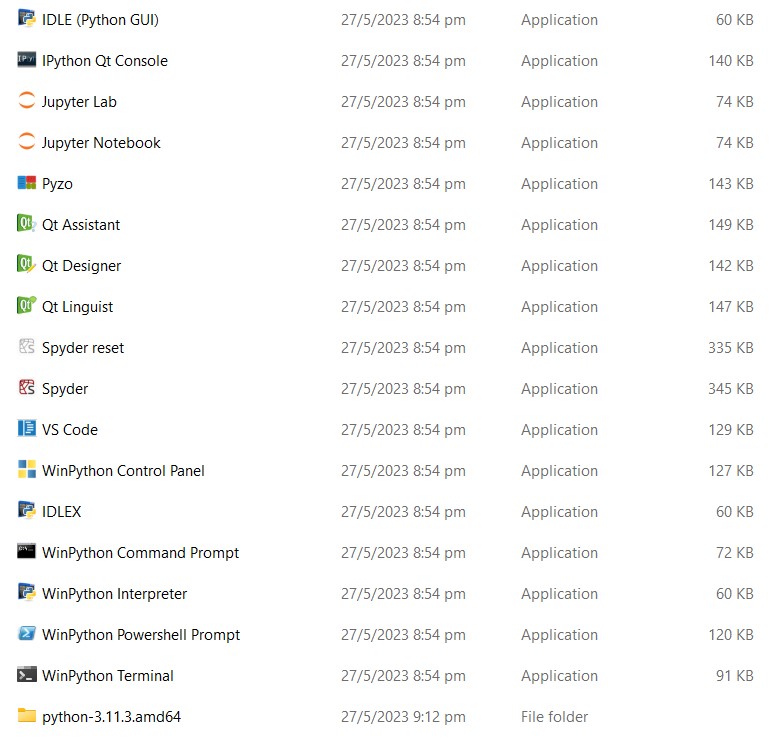 With Spyder IDE  |
| Comments | The most complete and probably most advance portable
distribution, however this comes to the cost of weight. If not
a problem then definitively a solution to consider |
3. Online Python
Another way to program in Python without installing anything is to rely on a remote solution. There are indeed different online Python systems that can be considered.
3.1 Google Colab
| Editor / Maintenance | |
| App name | Google Colab |
| IDE |
Derived from Jupyter-lab |
| Features (as of redaction of this page) | Latest Python kernel updated regularly Many packages pre-installed, can install more with pip install (however need to reinstall each time a new session is opened) |
| Size | Online The user must have a Google Account |
| Screenshots | Website : Running  |
| Comments | This the author's preferred online Python interpreter. It is
based on Jupyter-lab, only requires a Google Account, and link
with your Google Drive to save the file. It is free, however
it is possible to buy some computing units if the project you
work on is really demanding in calculations. The only thing to keep in mind is that it is Google so we can be pretty sure they will analyse what you are doing, thus (the free version at least) not for confidential developments |
Top 5 Most
Popular
1. Compressor
Power Calculation
2. Pump Power Calculation
3. Pipe Pressure
Drop Calculation
4. Fluid Velocity in pipes
5. Churchill Correlation
(friction factor)
3.2 Brython
| Editor / Maintenance | Pierre Quentel |
| App name | Brython |
| IDE |
Own interface |
| Features (as of redaction of this page) | Latest Python kernel updated regularly |
| Size | Online |
| Screenshots | Website : Running  |
| Comments | This is a very basic Python editor however it can be useful
to demonstrate concepts with students for example. Brython is
actually going much further than the online version and has
the ambition to replace Javascript as script language within
webpages |
3.3 CodeSkulptor 3
| Editor / Maintenance | Scott Rixner |
| App name | CodeSkulptor 3 |
| IDE |
Own interface |
| Features (as of redaction of this page) | Latest Python kernel updated regularly |
| Size | Online |
| Screenshots | Running
|
| Comments | This is a very basic Python editor however it can be useful to demonstrate concepts with students for example. |
3.4 Python Anywhere
| Editor / Maintenance | PythonAnywhere LLP Anaconda |
| App name | PythonAnywhere |
| IDE |
Derived from Jupyter notebook for paying accounts Console for free accounts |
| Features (as of redaction of this page) | Latest Python kernel updated regularly |
| Size | Online The user must create an account |
| Screenshots | Website : Running  |
| Comments | A solution clearly oriented for professionals, the free
version is not giving much, especially considering you can
only use a console to program and have only 100 s running time
of CPU allowed |